

How to Select a Travel Adapter: Plug Types Explained
How to select travel adapters for seamless charging in 2026
You arrive at your hotel after a long flight, exhausted and ready to recharge. You pull out your phone, laptop, and tablet, only to discover your travel adapter doesn’t fit the wall socket. Worse, your devices won’t charge at all. This nightmare scenario happens to countless travellers each year, costing time, stress, and sometimes device damage. Choosing the right travel adapter isn’t just about convenience; it’s about protecting your electronics and ensuring you stay connected wherever your journey takes you. This guide walks you through everything you need to confidently select adapters that work safely and reliably across the globe.
Table of Contents
- Understanding International Plug Types And Voltage Compatibility
- Choosing The Right Adapter For Your Itinerary
- Essential Technical Specifications And Safety Features
- Step-By-Step Guide On How To Select Your Travel Adapter
- Common Mistakes And Troubleshooting When Using Travel Adapters
- Expected Outcomes And How To Measure Success
- Frequently Asked Questions
Key takeaways
| Point | Details |
|---|---|
| Plug diversity | Different countries use varied plug types and voltage standards, requiring specific adapter compatibility. |
| Voltage compatibility | Most modern devices support universal voltage, reducing converter needs significantly. |
| Adapter selection | Choose universal adapters for multi-destination trips and country-specific for single locations. |
| Multi-port efficiency | Multi-port USB adapters enhance charging efficiency for multiple devices simultaneously. |
| Safety priority | Safety certifications and built-in protections are critical for safe use and device longevity. |
Understanding international plug types and voltage compatibility
Global travel exposes you to a bewildering array of electrical standards. The world uses over 15 different plug types, each designed for specific regions and safety requirements. Understanding these variations prevents compatibility disasters and potential device damage.
Common plug types include Type A and B (used across the Americas and Japan), Type C and E (standard throughout continental Europe), Type G (UK, Ireland, and former British colonies), and Type I (Australia, New Zealand, China). Each serves distinct geographical zones, so identifying your destination’s plug type is your first critical step. North American plugs won’t fit European sockets, and vice versa.
Voltage ranges add another layer of complexity. The Americas primarily operate on 100-120V systems, whilst Europe, Asia, and most other regions use 220-240V. Frequency standards also vary between 50Hz and 60Hz, though this matters less for modern electronics. The good news? Most modern electronic chargers support input voltage range from 100–240V, eliminating the need for voltage converters in most cases.
Check your device charger labels carefully. If you see “Input: 100-240V~50/60Hz,” you only need a plug adapter, not a voltage converter. This universal voltage compatibility covers phones, laptops, tablets, cameras, and most USB-powered devices manufactured after 2015.
Here’s a quick reference for common plug types:
- Type A/B: United States, Canada, Mexico, Japan
- Type C/E/F: France, Germany, Spain, Italy, Netherlands
- Type G: United Kingdom, Ireland, Singapore, Malaysia
- Type I: Australia, New Zealand, China, Argentina
- Type D/M: India, South Africa, Nepal
Choosing the right adapter for your itinerary
Your travel pattern dictates whether you need a universal adapter or country-specific plugs. Universal travel adapters that support 200+ countries simplify multi-destination travel by combining multiple plug configurations into one device. They’re ideal for frequent travellers visiting diverse regions, eliminating the need to carry separate adapters for each destination.
Universal adapters feature sliding or rotating mechanisms that reveal different plug types. They accommodate virtually any socket worldwide and often include USB ports for simultaneous device charging. The trade-off? They’re bulkier and heavier than single-country adapters, taking up more luggage space.

Country-specific adapters offer a lightweight alternative for focused travel. If you’re visiting only France or only Australia, a dedicated adapter weighs less and costs a fraction of universal models. They’re compact, reliable, and perfectly suited for extended stays in one location or regular trips to the same region.
Multi-port USB capability transforms basic adapters into charging stations. Modern adapters incorporate USB-C and USB-A ports, allowing you to charge phones, tablets, e-readers, and headphones without individual charging bricks. This travel adapter selection reduces cable clutter and maximises efficiency.
| Feature | Universal Adapter | Country-Specific Adapter |
|---|---|---|
| Coverage | 200+ countries | Single country or region |
| Portability | Bulkier, heavier | Compact, lightweight |
| Cost | Higher investment | Budget-friendly |
| USB ports | Often 3-4 ports | Usually none or 1-2 |
| Best for | Frequent multi-destination travel | Single destination trips |
Consider your device count too. Travelling with a laptop, phone, tablet, smartwatch, and headphones? A universal adapter with four USB ports eliminates the need for multiple outlets. Solo travellers with just a phone might prefer a simple country-specific plug.
Essential technical specifications and safety features
Technical specifications determine whether your adapter can handle your devices’ power demands safely. USB-C Power Delivery (PD) has revolutionised travel charging, with adapters supporting up to 100W or higher providing fast charging for high-powered devices like laptops. Check the wattage rating carefully; a 65W USB-C port charges most laptops, whilst 100W+ handles power-hungry models.
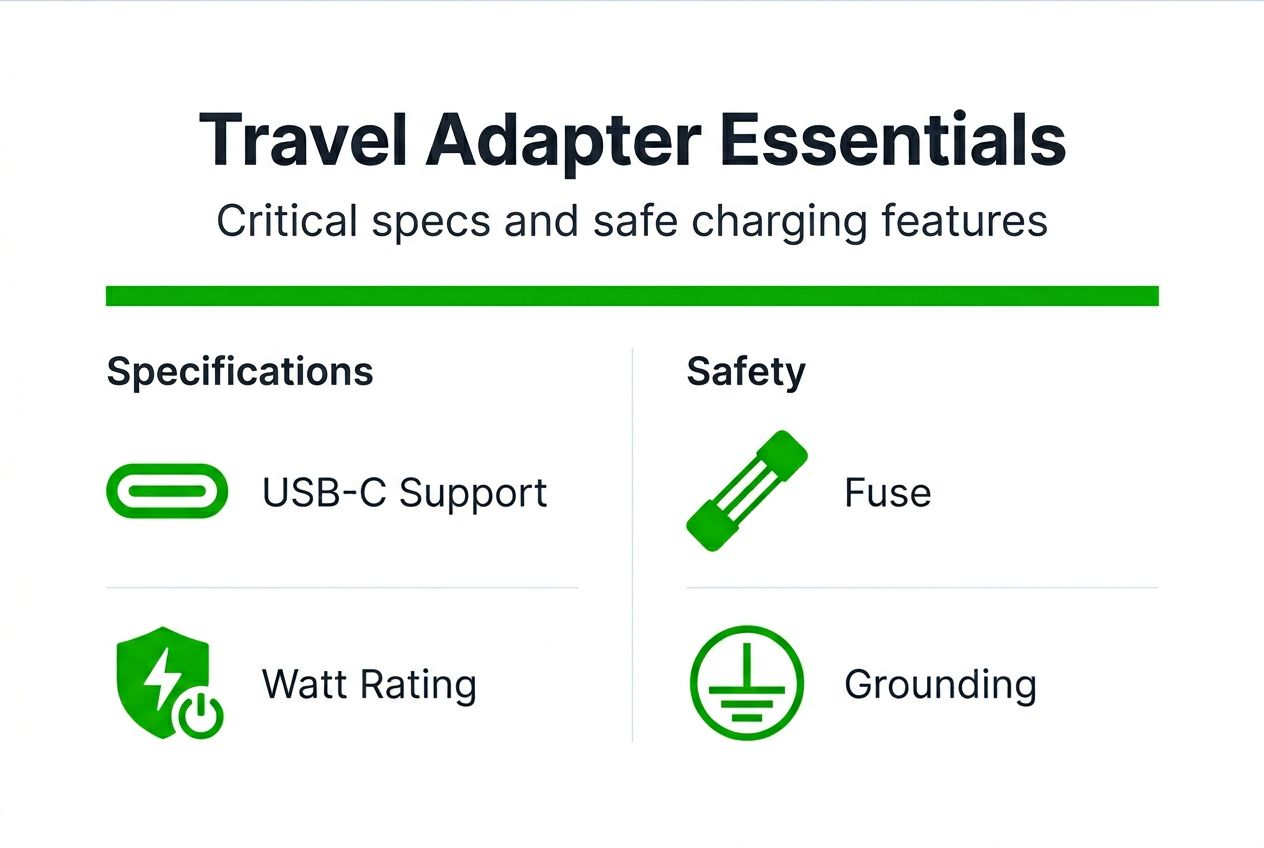
Grounding becomes critical for three-prong devices. Laptops, hairdryers, and certain camera chargers require grounded connections to prevent electrical shock hazards. Adapters supporting grounded plugs (Type G, Type F) provide an essential safety pathway, channelling excess current safely away from you and your devices.
Safety features separate quality adapters from dangerous imitations. Travel adapters with built-in safety features such as fuses, surge protection, and plug-lock systems greatly reduce the risk of electrical damage and accidents. Replaceable fuses act as sacrificial components, breaking the circuit during power surges to protect your expensive electronics.
Essential safety mechanisms include:
- Replaceable fuses: Prevent damage from electrical surges by breaking the circuit
- Surge protection: Absorbs voltage spikes from unstable power grids
- Child safety shutters: Block foreign objects from being inserted into sockets
- Plug-lock mechanisms: Prevent accidental disconnection during charging
- Thermal protection: Automatically shuts down if overheating occurs
Certifications matter enormously for safety and legal compliance. CE (European Conformity), FCC (US Federal Communications Commission), and RoHS (Restriction of Hazardous Substances) marks indicate the adapter meets stringent safety and environmental standards. Never compromise on certification to save a few pounds; uncertified adapters pose fire and electrocution risks.
Understanding multi-device charger features and USB-C charging standards helps you maximise charging efficiency whilst maintaining safety standards across all your devices.
Pro Tip: Use short, 5A-rated USB-C cables for optimal fast charging performance. Longer cables increase resistance, slowing charge speeds and potentially causing compatibility issues with Power Delivery protocols.
Step-by-step guide on how to select your travel adapter
Following a systematic approach ensures you choose the perfect adapter for your specific needs. This sequence eliminates guesswork and prevents costly mistakes.
- Check device charger labels for voltage and frequency compatibility (look for 100-240V~50/60Hz markings on your power bricks).
- List all travel destinations and identify corresponding plug types using online resources or travel guides.
- Decide between universal or country-specific adapter based on itinerary length and destination diversity.
- Prioritise adapters with multiple USB ports and sufficient power delivery (USB-C PD up to 100W+ for laptops).
- Verify inclusion of safety features: replaceable fuses, surge protection, grounding support, and child safety shutters.
- Confirm required certifications (CE, FCC, RoHS) are clearly marked on the product packaging.
- Calculate total device wattage needs by adding up all devices you’ll charge simultaneously.
- Read recent user reviews focusing on reliability, build quality, and customer service experiences.
Many travellers mistakenly purchase voltage converters when their devices support universal voltage, adding unnecessary bulk and cost. This common error stems from confusing older equipment requirements with modern electronics. Today’s smartphones, laptops, and tablets rarely need voltage conversion.
Review this travel adapter features checklist to ensure you’ve considered every critical specification before purchasing. Missing even one specification can result in charging failures or safety hazards.
Common mistakes and troubleshooting when using travel adapters
Even experienced travellers make preventable errors that compromise device safety or charging success. Recognising these pitfalls helps you avoid frustrating situations abroad.
Ignoring device voltage requirements remains the most dangerous mistake. Plugging a 120V-only hairdryer into a 240V European socket without a converter destroys the device instantly and may cause fires. Always verify whether your device supports dual voltage before travelling.
Confusing adapters with voltage converters causes countless charging failures. Adapters change plug shapes; converters change voltage levels. Using an adapter alone with a voltage-incompatible device results in no charging at best, damaged electronics at worst. Understand the distinction clearly.
Using non-grounded adapters with three-prong devices increases shock risk significantly. Laptops and other grounded equipment rely on that third prong for electrical safety. Two-prong adapters bypass this protection, creating potential electrocution hazards in faulty electrical systems.
Selecting adapters with too few USB ports reduces charging efficiency when travelling with multiple devices. You end up competing for limited charging spots or waiting for devices to charge sequentially. Calculate your simultaneous charging needs accurately.
Common troubleshooting scenarios:
- Device won’t charge: Verify voltage compatibility and check if the adapter supports sufficient wattage
- Adapter feels hot: Normal warmth is acceptable, but excessive heat indicates overloading; reduce connected devices
- Loose connection: Some sockets are worn; try different outlets or use plug-lock features
- Blown fuse: Replace with the correct amperage rating (usually 6A or 10A)
Up to 70% of device failures during travel stem from not checking voltage compatibility and using the wrong adapters. This staggering statistic underscores the importance of proper preparation and understanding your equipment’s requirements.
Review these portable charging mistakes to avoid for comprehensive guidance on maintaining device health whilst travelling.
Pro Tip: Always check labels and user manuals before travel and carry spare fuses or cables. Hotel staff rarely stock replacement fuses, and finding compatible replacements in foreign countries wastes precious holiday time.
Expected outcomes and how to measure success
A properly selected travel adapter delivers measurable benefits throughout your journey. Evaluating these outcomes confirms you made the right choice.
Your devices should consistently fit local outlets without forcing or modification. Physical compatibility is immediate and obvious; if you’re struggling to insert plugs or they fall out easily, something’s wrong. Quality adapters provide snug, secure connections.
All devices charge reliably without interruptions or overheating during the charging cycle. Monitor charging times; they should match your home charging speeds (accounting for Power Delivery capabilities). Abnormally slow charging or frequent disconnections signal compatibility issues.
The ability to charge multiple devices simultaneously via USB ports transforms your hotel room into an efficient charging station. You should wake up each morning with all devices fully charged and ready, never juggling which device gets priority.
No electrical faults, shocks, or adapter malfunctions should occur throughout your trip. Quality adapters operate silently and coolly, with no sparking, buzzing, or burning smells. Any unusual symptoms demand immediate disconnection.
Success indicators include:
- Zero charging-related delays or disruptions to your travel schedule
- All devices maintain optimal battery health without damage or degradation
- Simplified packing with one adapter replacing multiple country-specific plugs
- Confidence using electrical systems in unfamiliar countries
- Peace of mind knowing your devices are protected by proper safety features
Ultimately, you gain peace of mind and convenience throughout your travels. The right adapter becomes invisible; it simply works, allowing you to focus on experiences rather than technical frustrations.
Shop reliable travel adapters and accessories at Charg-R
Now that you understand what makes an excellent travel adapter, finding quality products becomes straightforward. Charg-R offers universal adapters with multiple USB-C and USB-A ports to keep devices connected worldwide, combining the broad compatibility you need with the safety features that matter.
Products feature advanced safety mechanisms like auto-resetting fuses and surge protection, eliminating the risks associated with budget alternatives. The GoPlug travel adapter delivers essential functionality for single-destination trips, whilst the GoPlug Max 100W international travel adapter handles demanding multi-device charging needs across every continent.
Powerbanks with USB-C Power Delivery complement adapters perfectly for on-the-go charging convenience when outlets aren’t available. The Slatebank 100W PD powerbank ensures your devices stay charged during long flights, train journeys, or outdoor adventures where wall sockets don’t exist. Pairing quality adapters with reliable powerbanks creates a complete charging ecosystem for any travel scenario.
Frequently asked questions
How do I know if I need a voltage converter or just an adapter?
Most modern chargers support 100-240V, so usually only an adapter is needed to change the plug shape. Check your device’s power brick label; if it shows “100-240V,” you’re covered globally. Voltage converters are needed only if your device operates exclusively at 120V or 240V, which is rare for electronics manufactured after 2015.
What safety features should I look for in a travel adapter?
Look for built-in fuses, surge protection, child safety shutters, and grounding support for comprehensive protection. Certifications like CE, FCC, and RoHS indicate compliance with international safety standards and proper manufacturing quality. Never compromise on safety certifications to save money; the risks far outweigh any savings.
Can I charge multiple devices at once with one travel adapter?
Adapters with multiple USB-A and USB-C ports allow simultaneous charging of several devices without needing multiple wall outlets. High-power USB-C Power Delivery ports enable fast charging for laptops and tablets alongside phones and accessories. Calculate your total wattage needs to ensure the adapter can handle all devices safely.
Are universal travel adapters bulkier than country-specific ones?
Universal adapters cover many countries but tend to be bulkier due to multiple plug configurations and mechanisms. Country-specific adapters are lighter and more compact, suited for single destination trips or regular travel to one region. The convenience of universal coverage often justifies the slightly larger size for frequent travellers.