

Step-by-Step Guide to Wireless Charging Success
Finding the perfect wireless charger can feel overwhelming when every trip or busy workday demands reliable power for your Apple devices. The right choice means you skip the hassle of tangled cables, slow charges, and compatibility issues wherever you are—from a London office to a Paris café. With the Qi standard technology now dominating wireless charging for portable electronics, you’ll discover how to match world-class convenience, style, and safety to your fast-paced lifestyle.
Table of Contents
- Step 1: Select The Right Wireless Charger
- Step 2: Connect Your Charger And Prepare Devices
- Step 3: Align Devices For Optimal Charging
- Step 4: Verify Charging Status And Safety
Quick Summary
| Key Point | Explanation |
|---|---|
| 1. Choose an optimised charger | Ensure your wireless charger supports the specific technology for your device species, such as Qi or MagSafe, for best performance. |
| 2. Prioritise correct alignment | Align your device centrally on the charger to maximise charging efficiency and speed. Poor alignment can lead to slow charging. |
| 3. Verify safety features | Use Qi-certified chargers to ensure safety and efficiency, protecting your devices from overheating and other risks during charging. |
| 4. Check for compatibility | Make sure your device is compatible with the charger, removing any thick cases that may obstruct the wireless signal. |
| 5. Monitor charging status | Keep an eye on visual and auditory indicators while charging. Extreme heat or unusual smells signal potential hazards needing immediate attention. |
Step 1: Select the right wireless charger
Choosing the right wireless charger transforms how you power your devices. This step determines whether you’ll enjoy seamless charging or face compatibility headaches, slow speeds, and potential safety concerns.
Start by identifying your primary device. If you’re charging an iPhone, iPad, or AirPods, you’ll want something specifically optimised for Apple devices. Look for chargers that support Qi standard technology, which dominates the global wireless charging market and ensures broad compatibility across most smartphones and portable electronics.
Qi standard certification isn’t just marketing speak—it’s your guarantee that the charger meets safety and interoperability standards.
Consider these critical factors when evaluating options:
- Device compatibility matters most. Apple devices use either basic Qi or MagSafe technology, so verify your charger supports what you own
- Charging speed varies dramatically between chargers. Look for power output measured in watts (W) to match your device’s capabilities
- Design and portability should suit your lifestyle. Travellers benefit from compact, lightweight designs that slip into bags without bulk
- Safety features protect your investment. Quality chargers include temperature control and foreign object detection
Your lifestyle shapes what works best. A frequent traveller needs something ultra-portable and reliable across different countries. Someone who charges at their desk prioritises stability and aesthetics. MagSafe compatibility options offer added convenience for Apple device users seeking magnetic alignment and efficiency.
Always check the technical specifications rather than marketing claims. Wattage, certification badges (like Qi or FCC marks), and material quality reveal far more than flashy packaging.
Here’s how popular wireless charging standards differ for everyday users:
| Standard | Typical Devices Supported | Alignment Method | Maximum Power Output |
|---|---|---|---|
| Qi (basic) | Most smartphones, AirPods | Manual, centre pad | 5–15W |
| MagSafe | Recent iPhones (12+) | Magnetic alignment | Up to 15W |
| Proprietary | Some Android models, wearables | Varies by brand | 10–50W+ |
Pro tip: Buy from retailers that offer detailed specifications and genuine product certifications—avoid unmarked chargers or suspiciously cheap alternatives, as they often lack proper safety protections and may damage your battery over time.
Step 2: Connect your charger and prepare devices
You’re ready to set up your wireless charger properly. This step ensures safe operation, optimal charging performance, and protects your devices from potential damage.
Start by choosing the right location for your charger. Place it on a flat, stable surface away from water, humidity, and direct sunlight. A well-ventilated area prevents heat buildup, which can affect charging efficiency and device battery health. Avoid placing your charger near other electronics or metal objects that could interfere with the wireless signal.
Now connect your charger to power using a compatible adapter. Most quality wireless chargers come with a USB cable, but verify that your power adapter matches the charger’s requirements. Plug the charger into a reliable power source and watch for the indicator light, which confirms the charger is ready to use.
A glowing indicator light means your charger is properly connected and waiting for a device.
Prepare your devices before placing them on the charger:
- Remove cases or protective covers if they’re thicker than 3mm or contain metal components. Thin cases usually work fine, but bulky ones can interfere with charging
- Disable any incompatible cases that might block the wireless signal between your device and charger
- Ensure wireless charging is enabled on your device. Most iPhones and iPads have this enabled by default
- Check device compatibility with Qi-certified chargers before your first use
When you place your iPhone on the charger, position it display facing upwards and centred over the charging coils. Your device should align properly with the charger’s centre point for the best charging speed. You’ll see a charging indicator appear on your screen within seconds.

If you’re using MagSafe-compatible devices, the magnetic alignment makes this even simpler—just let the magnets guide your phone into the perfect position automatically.
Pro tip: Leave your charger plugged in permanently at your desk or bedside, and establish a routine of placing your device on it each evening. This way, you’ll never think about charging again—your devices simply stay topped up without you lifting a finger.
Step 3: Align devices for optimal charging
Proper alignment is the difference between fast charging and painfully slow power-ups. This step unlocks your charger’s true potential by positioning your device precisely over the charging coils.
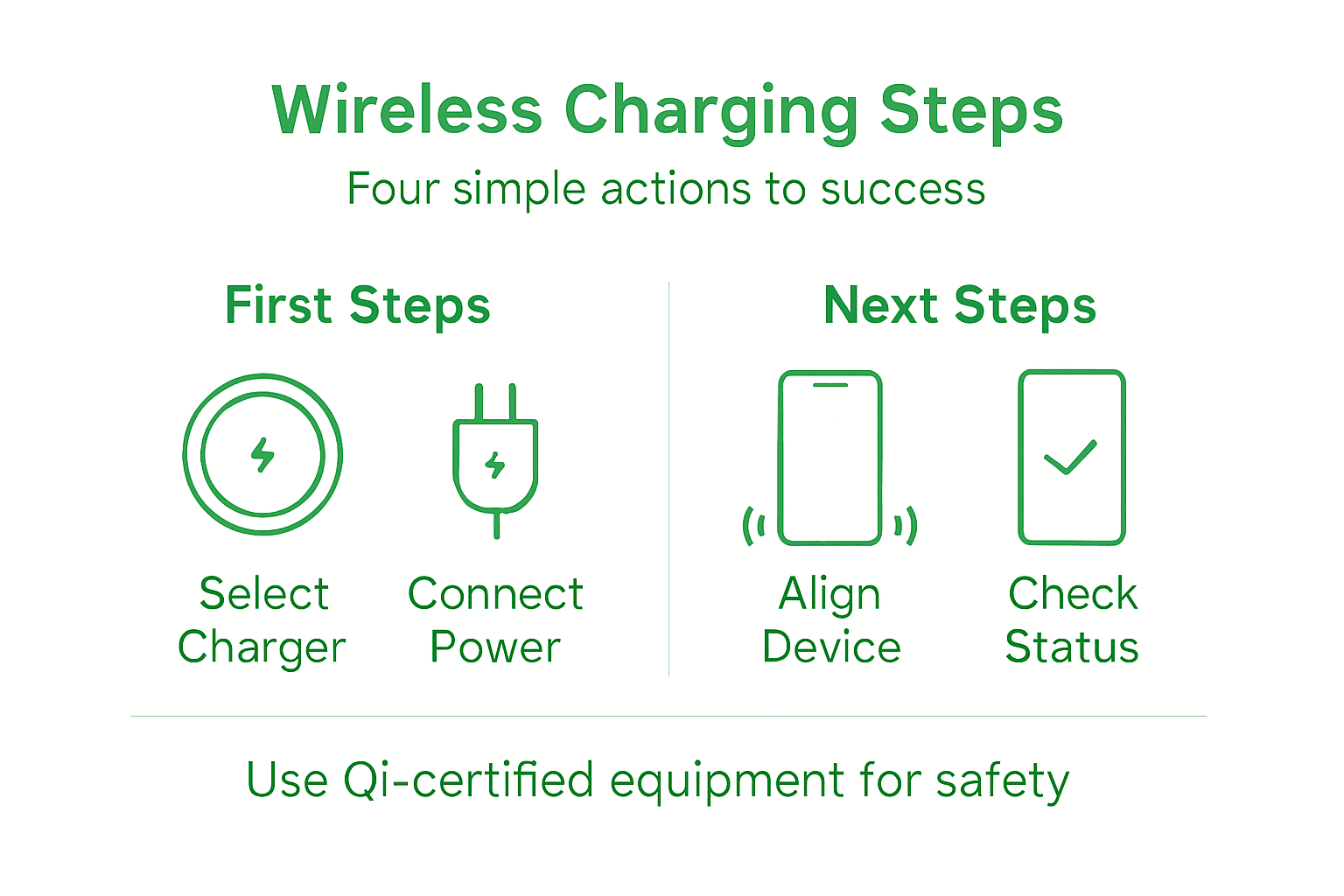
Start by placing your device in the centre of the charging pad or stand. Most wireless chargers have a clear charging area marked on the surface. Your iPhone should rest flat and level, with no tilting or shifting. This central position maximises the magnetic field coupling between your device’s receiver coil and the charger’s transmitter coil.
Remove any obstructions that might block the connection. Thick cases, metal rings, or protective accessories create distance between coils, reducing charging efficiency dramatically. Even a 3mm gap can significantly slow your charging speed. If you’re using a thin case, leave it on, but test without it if charging feels sluggish.
Perfect alignment happens when your device sits completely flat and centred—you’ll notice charging begins almost instantly.
Modern chargers use clever technology to optimise the connection. Active alignment systems automatically detect your device’s position and adjust transmitter coils dynamically to maximise efficiency. However, your job is still to position the device correctly in the first place.
If charging seems slow, try these quick adjustments:
- Shift your device slightly if it’s not charging efficiently. Even millimetres matter when aligning coils
- Ensure your charger sits on a stable surface away from vibrations or movement
- Check that nothing metal is nearby, as ferrous materials interfere with wireless signals
- Verify your device isn’t overheating, as thermal throttling slows charging automatically
Magnetic charging solutions make alignment effortless by using magnets to guide your device into the perfect position automatically. With MagSafe-enabled chargers, just bring your iPhone close and let the magnets snap it into place.
You’ll know alignment is perfect when your device displays the charging indicator and your charger’s LED glows steadily. If the light flickers or breathing light cycles, your device isn’t properly aligned.
Pro tip: Mark your charger’s sweet spot with a subtle dot or line using a dry-erase marker, so you always know exactly where to place your device. This eliminates guesswork and ensures you’re never charging inefficiently.
Step 4: Verify charging status and safety
Now that your device is positioned correctly, you need to confirm it’s charging safely and efficiently. This step ensures your battery stays healthy and your charger operates as intended.
Watch for visual indicators on your device and charger. Your iPhone will display a charging symbol in the status bar or on the lock screen within seconds of proper contact. The charger’s LED light should glow steadily (usually green or blue, depending on the model). If the light flickers, pulses, or remains off, your device isn’t making proper contact with the charging coils.
Listen for audio cues too. Many iPhones emit a subtle sound when charging begins. If you place your device on the charger and hear nothing after 10 seconds, remove it and reposition it slightly towards the centre.
A steady LED light and immediate charging symbol mean your charger is working perfectly.
Check your device’s temperature during charging. Place your hand on the back of your phone or tablet—it should feel slightly warm, never hot. Excessive heat indicates a problem that needs immediate attention. If your device feels too warm, disconnect it immediately and allow it to cool for 15 minutes before trying again.
Quality matters when it comes to safety. Qi-certified chargers undergo rigorous safety testing for electrical safety, energy efficiency, and temperature controls. This certification guarantees your charger includes features like foreign object detection and thermal protection. Always verify your charger carries official Qi certification before using it regularly.
Monitor these safety signs throughout your charging session:
- Temperature remains moderate during the entire charging process
- No unusual smells emerge from the charger or device
- The LED indicator stays steady, not flickering or pulsing erratically
- Your device’s battery percentage increases consistently without sudden jumps or drops
- No condensation appears on your phone’s screen or charger surface
If your device feels warm or the charger malfunctions, stop using it immediately. Unplug the charger, allow everything to cool, and investigate the issue before resuming. Trust your instincts—if something feels wrong, it probably is.
Use this table to quickly assess wireless charging safety risks:
| Warning Sign | Likely Cause | Immediate Action |
|---|---|---|
| Rapid device heating | Misalignment, poor charger | Remove device, let cool |
| LED flickering or pulsing | Signal interference | Reposition and check for metal |
| Odd smells or discolouration | Charger failure | Unplug and stop charging |
| Battery drains while charging | Incompatible device | Check compatibility settings |
Pro tip: Check your charger’s safety status monthly by looking for official Qi certification marks and inspecting cables for damage. Replace any charger showing visible wear, discolouration, or unusual behaviour, as these signs indicate failing safety systems.
Unlock Wireless Charging Excellence with Charg-R
Wireless charging can be frustrating when your device struggles with poor alignment, slow speeds, or safety concerns. The step-by-step guide highlighted crucial issues such as selecting the right Qi-certified charger, ensuring perfect device positioning, and verifying safe and efficient charging. If you want to avoid the common pitfalls of unreliable chargers and bulky accessories, choosing a premium, compact, and fast charger designed for Apple and other compatible devices is essential.
Experience seamless wireless charging today with Charg-R, your go-to source for high-quality wireless chargers and portable power solutions. Our collection focuses on safety, speed, and sleek design to keep your devices topped up without disruption. Don’t wait for charging troubles to slow you down. Visit Charg-R’s homepage now and explore our full range. Discover innovative power banks, travel-friendly chargers, and MagSafe-compatible accessories that match your tech lifestyle perfectly.
Frequently Asked Questions
How do I choose the right wireless charger for my device?
To choose the right wireless charger, start by ensuring it is compatible with your device’s charging technology, such as Qi or MagSafe. Check the power output in watts to match your device’s capabilities for optimal charging speed.
What should I do if my device is not charging on the wireless charger?
If your device isn’t charging, first ensure it is centred and flat on the charger. Remove any thick cases or metal components that could obstruct the connection, and verify that the charger is properly plugged into a power source.
How do I ensure safe operation while using a wireless charger?
To ensure safe operation, use a Qi-certified charger and place it on a flat, stable surface away from metal objects and moisture. Regularly monitor your device’s temperature during charging; it should feel slightly warm but never hot.
What factors can affect wireless charging speed?
Wireless charging speed can be affected by factors such as device alignment on the charger, the wattage of the charger, and any obstructions like thick cases. To maximise speed, remove any obstructions and centre your device on the charging pad.
How can I maintain my wireless charger for optimal performance?
To maintain your wireless charger, regularly check for signs of wear, such as frayed cables or discolouration. Additionally, keep the charging surface clean and inspect for any foreign objects that could disrupt charging efficiency.